
octobre 15, 2025 by Sumit
In relational databases, data is often distributed across multiple tables to avoid redundancy. To combine data from different tables, SQL provides joins. Understanding joins is essential for writing efficient queries and extracting meaningful insights.
What is a SQL Join?
A join is a SQL operation that allows you to combine rows from two or more tables based on a related column. The most common related column is usually a foreign key.
Types of SQL Joins
- INNER JOIN
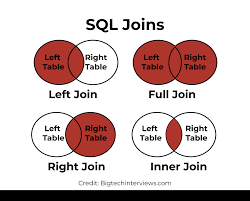
Returns only the rows where there is a match in both tables.
SELECT orders.id, customers.name, orders.amount
FROM orders
INNER JOIN customers ON orders.customer_id = customers.id;
- Only customers who have placed orders are included.
- Most commonly used join type.
- LEFT JOIN (or LEFT OUTER JOIN)
Returns all rows from the left table, and matching rows from the right table. If no match exists,NULLis returned for the right table.
SELECT customers.name, orders.id, orders.amount
FROM customers
LEFT JOIN orders ON customers.id = orders.customer_id;
- Includes all customers, even those who haven’t placed any orders.
- RIGHT JOIN (or RIGHT OUTER JOIN)
Returns all rows from the right table, and matching rows from the left table.NULLis returned for left table rows with no match.
SELECT customers.name, orders.id, orders.amount
FROM customers
RIGHT JOIN orders ON customers.id = orders.customer_id;
- Includes all orders, even if some don’t have a corresponding customer (less common).
- FULL OUTER JOIN
Returns rows when there is a match in either table. If no match exists,NULLis returned for the missing side.
SELECT customers.name, orders.id, orders.amount
FROM customers
FULL OUTER JOIN orders ON customers.id = orders.customer_id;
- Combines results of both LEFT and RIGHT joins.
- CROSS JOIN
Returns the Cartesian product of two tables (every row from the first table paired with every row from the second).
SELECT customers.name, orders.id
FROM customers
CROSS JOIN orders;
- Rarely used, but useful for generating combinations.
- SELF JOIN
A table joins with itself to compare rows within the same table.
SELECT e1.name AS Employee, e2.name AS Manager
FROM employees e1
LEFT JOIN employees e2 ON e1.manager_id = e2.id;
- Useful for hierarchical or recursive relationships.
Tips for Using Joins
- Always use explicit
JOINsyntax rather than commas; it’s clearer and easier to maintain. - Use indexes on join columns for faster queries.
- Be careful with FULL and CROSS JOINs, as they can produce large result sets.
- Alias tables for readability, especially with multiple joins.
Conclusion
SQL joins are powerful tools for combining data across multiple tables, helping you analyze complex datasets efficiently. By mastering INNER, LEFT, RIGHT, FULL, CROSS, and SELF joins, you can write queries that fetch exactly the information you need in a clear and efficient manner.